Troubleshooting
All new solar and battery systems are smart connected to the Horizon Power network. This enables us to sometimes energy manage your system via a Secure Gateway Device (SGD) - to maintain network stability.
If there's an issue with your system, find out about about the first steps to take, to get your system reconnected.
- If the SGD is offline your system will go into fail-safe mode and your solar system will stop generating electricity.
- If you've moved into a home with smart connected solar, you'll need to connect the system to the internet before it can start generating electricity.
Faults & issues
If the SGD is offline your system will go into fail safe mode and your solar system will stop generating electricity. You can check if the system is generating electricity by:
- checking the digital readout display on the inverter; or
- your solar system's manufacturers app if you have access to this.
If the troubleshooting steps don’t resolve the issue with your SGD, our Technical Engineers will attempt to resolve the issue remotely within 5 business days.
In the unlikely event that the device needs to be replaced, we'll contact you to arrange a suitable time to carry out a replacement within 15 business days from ordering a replacement.
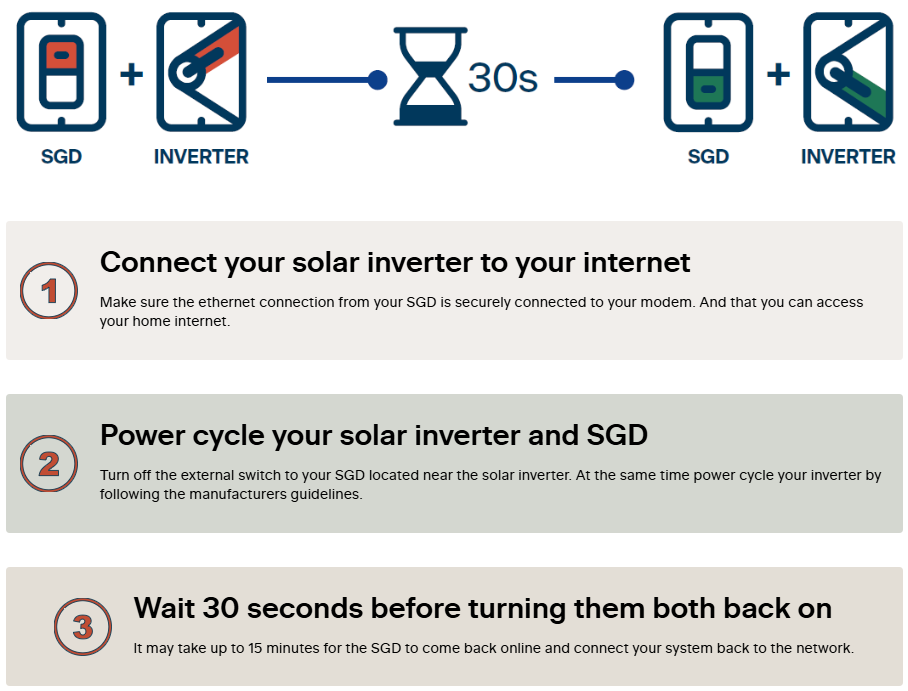
Here's what to do to get your system back online
There's 3 simple steps to power-cycle the Secure Gateway Device (SGD) off and on to reconnect your system to the network.
We're here to help
Call us anytime between 8am-5pm, or send us a message, and we'll get back to you as soon as possible.
Horizon Power acknowledges the Traditional Custodians throughout Western Australia and their continuing connection to the land, waters and community. We pay our respects to all members of the Aboriginal communities and their cultures; and to Elders past, present and emerging.
Aboriginal and Torres Strait Islander people are advised that this website may contain images, names or voices of deceased people.